Building an endless curved tunnel in React Three Fiber
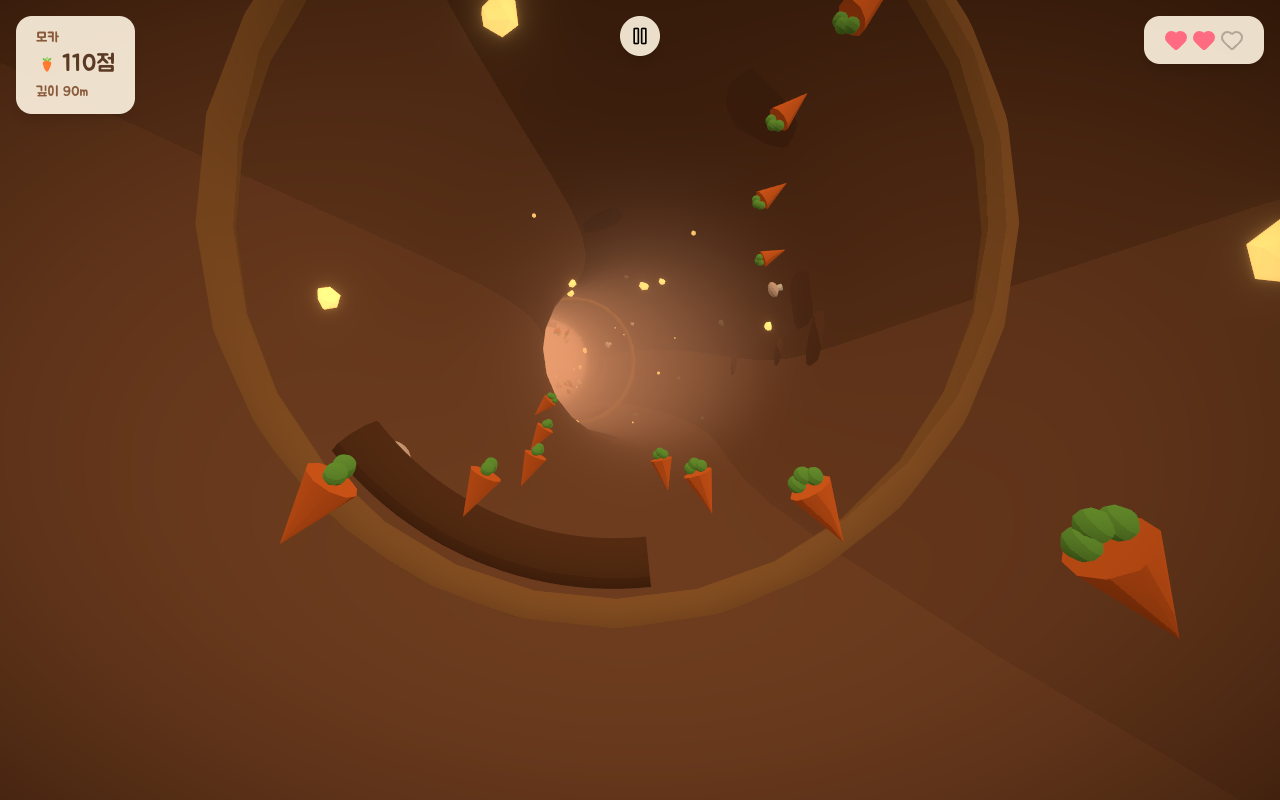
The burrow in Rabbit Hole goes down forever and keeps bending left and right.
A mesh that long is obviously off the table, so what's actually on screen is six wall segments that get recycled as the rabbit falls.
This is how the tunnel works, along with a bug near the end that took me way too long to catch.
The game doesn't know the tunnel bends
The decision that saved me the most trouble was keeping the curve out of the gameplay code.
Collision, scoring, and spawning all run in tunnel coordinates: how far down you are (depth), an angle around the wall, and a height.
In that space the tunnel is a straight cylinder.
The bending is something the renderer does on top of those coordinates, so the path can wind however it wants and the physics never has to know about it.
That makes the whole path one small module.
You hand it a depth and it tells you two things: where the center of the tunnel is there, and which way it's facing.
No control points, just sine waves
The usual way to build a winding path is to drop a bunch of control points and run a Catmull-Rom spline through them.
I didn't want to store points or sample a curve at runtime.
I wanted to ask for the center at any depth and get it back instantly, so the center line is a sum of sine waves:
const X = (d) =>
  a1 * Math.sin((d / w1) * TAU + p1) +
  a2 * Math.sin((d / w2) * TAU + p2);
const Y = (d) => a3 * Math.sin((d / w3) * TAU + p3);
The amplitudes, wavelengths, and phases come from a seeded RNG (mulberry32), so one seed always produces the same tunnel.
That's what keeps the daily run fair: everyone gets the identical layout that day.
The wall meshes have to point along the path, which means I also need the tangent.
Since the center is just a function, I can differentiate it directly instead of doing finite differences:
const dX = (d) =>
  a1 * (TAU / w1) * Math.cos((d / w1) * TAU + p1) +
  a2 * (TAU / w2) * Math.cos((d / w2) * TAU + p2);
frame(d) then returns the position (X, Y, -d) and a quaternion built with lookAt down the tangent (dX, dY, -1).
One detail I'd keep: I ramp the curve up from zero over the first stretch with a smoothstep, so the tunnel is dead straight right under the spawn and only starts bending once the rabbit is moving.
A tunnel that's already leaning at the start looks broken.
Six segments, recycled
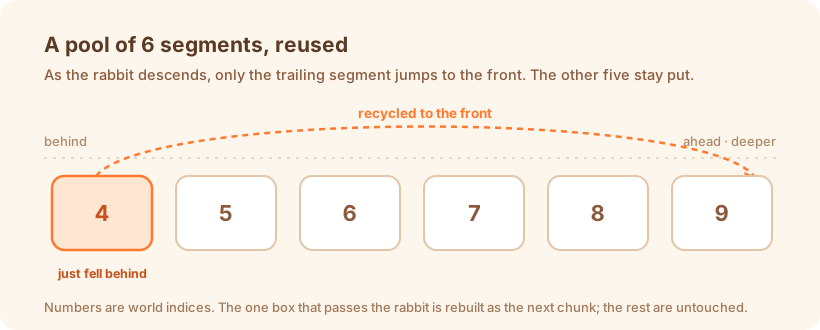
The tunnel is drawn by six <Segment> components.
Each owns a chunk of wall SEGMENT_LENGTH deep, and as the rabbit descends a segment doesn't get destroyed and remade.
It gets pointed at a new chunk further down.
The obvious way to assign chunks is base + index.
The trouble is that every segment's target shifts at the same moment you cross into a new chunk, so all six rebuild their geometry on one frame and you get a hitch.
A ring-buffer index fixes that, so only one segment rebuilds at a time:
export function segmentWorldIndex(base, index, count) {
  return base + ((((index - base) % count) + count) % count);
}
With base = Math.floor(depth / LEN) - 1, every segment stays mapped to a world index in [base, base + count - 1].
The only one that moves is whichever just dropped behind the rabbit, and it jumps back to the front.
Six meshes the whole time, one cheap rebuild when you cross a boundary.
Bending the wall with TubeGeometry
Each wall is a TubeGeometry.
Three.js will sweep a tube along any curve you give it, so I wrap the path in a small THREE.Curve subclass that samples the center between two depths:
class SectionCurve extends THREE.Curve {
  constructor(path, d0, d1) { super(); this.path = path; this.d0 = d0; this.d1 = d1; }
  getPoint(t, target = new THREE.Vector3()) {
    const d = this.d0 + (this.d1 - this.d0) * t;
    const c = this.path.center(d);
    return target.set(c.x, c.y, -d);
  }
}
The rebuild only runs when a segment's world index actually changes.
It swaps in the new geometry and disposes the old one:
if (worldIndex.current !== wi) {
  worldIndex.current = wi;
  wall.current.geometry.dispose();
  wall.current.geometry = new THREE.TubeGeometry(
    new SectionCurve(path, wi * LEN, (wi + 1) * LEN),
    TUBULAR_SEGMENTS, RADIUS, RADIAL_SEGMENTS, false,
  );
}
Don't skip the dispose().
Leave it out and you drop a TubeGeometry on the floor every time you cross a boundary, and it quietly eats GPU memory for the rest of the session.
The bug that only broke the first run
Now the annoying part.
That worldIndex.current !== wi guard is correct once things are moving, and it fooled me for days.
At depth zero the world index sits still for a while.
On a fresh page load the tunnel gets built from a placeholder seed before the real run starts.
When the run actually begins, the path object is swapped for the real daily one, but the integer world index hasn't changed, so the guard never fires and the first 150 meters or so keep rendering geometry from the placeholder.
Hitting retry reset the depth and rebuilt everything, so the second run looked perfect.
Reloading brought it right back.
First run broken, every run after it fine: the classic signature of an init-order bug.
The fix is to also watch the path object itself, not just the integer:
if (worldIndex.current !== wi || pathLast.current !== path) {
  worldIndex.current = wi;
  pathLast.current = path;
  // rebuild
}
The path only gets swapped once per run, so this does nothing in the steady state.
It just guarantees the first real frame rebuilds against the real path.
Wrapping up
What's actually on screen is six wall segments.
The curve hands back a position instantly at any depth, only one segment rebuilds when you cross a boundary, and nothing is allocated per frame while segments are reassigned.
That's how the tunnel can bend forever and still be the same run for everyone on the same seed that day.
Looking back, it all came down to that first decision: keep the gameplay logic in straight-cylinder coordinates, and only deal with the bend when you draw it.
If I built another endless runner, that's the structure I'd start from.