Fixing frame drops in React Three Fiber
Rabbit Hole got choppy as I added to it.
An endless tunnel rebuilding itself, decorations drifting, a camera chasing the rabbit, and at some point the frame rate stopped being smooth.
Every stutter turned out to come from the same three habits, and none of them are visible in a screenshot.
You only feel them while playing.
Here's what caused the drops and what fixed each one.

The budget you're working with
At 60fps you get about 16 milliseconds a frame to do everything: game logic, animation, and the render. useFrame runs your callback inside that window on every frame.
So the rule that actually matters isn't "write fast code," it's "don't wake up the garbage collector." A GC pause of a few milliseconds at a bad moment is a dropped frame, and you see it as a hitch.
That changes where you look.
Most R3F stutter isn't slow math.
It's memory pressure from code that allocates every frame.
1. Don't allocate inside useFrame
This is the big one.
It's completely natural to write vector math like this:
useFrame(() => {
  const offset = new THREE.Vector3(x, y, 0).applyQuaternion(frame.quat).add(frame.pos);
  mesh.position.copy(offset);
});
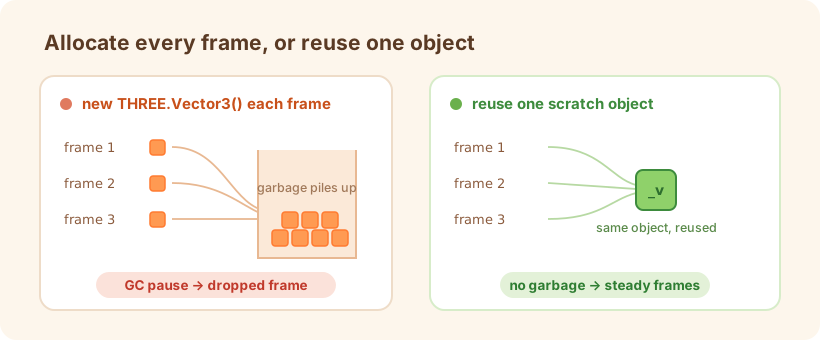
Every new THREE.Vector3() and new THREE.Quaternion() there is a fresh allocation, sixty times a second, times however many objects you're placing.
It's fine in a demo and slowly buries a real scene in garbage.
The fix is scratch objects.
Allocate them once, keep them in refs, and reuse them every frame.
In the tunnel, every placement in the hot path goes through the same few reusable temporaries:
const _v = useRef(new THREE.Vector3());
const _q = useRef(new THREE.Quaternion());

useFrame(() => {
  _v.current.set(x, y, 0).applyQuaternion(f.quat).add(f.pos);
  mesh.position.copy(_v.current);
  mesh.quaternion.copy(f.quat).multiply(_q.current.setFromAxisAngle(Z_AXIS, angle));
});
Same math, nothing allocated. .set() overwrites the object you already have instead of making a new one.
Once this is a habit, a new inside a frame loop starts to look wrong.
2. Recycle objects instead of mounting and unmounting
The second habit that hurts is expressing "the world scrolls past" by adding meshes as they come into view and removing them as they leave.
In R3F, mounting and unmounting means React reconciliation plus building and disposing Three.js objects, which is far too heavy to do over and over.
The tunnel never does that.
It draws a fixed pool of six wall segments, and as the player descends each segment gets pointed at a new stretch of tunnel instead of being thrown away.
A segment only rebuilds its geometry when the chunk it represents changes, and even then it's one segment, behind a cheap integer check:
if (worldIndex.current !== wi) {
  worldIndex.current = wi;
  wall.current.geometry.dispose();
  wall.current.geometry = new THREE.TubeGeometry(/* ... */);
}
Same idea for carrots, obstacles, particles, anything that "spawns." Keep a pool, hide and reposition, never mount per item.
And when you do replace a geometry, dispose the old one or you'll leak GPU memory for the whole session.
3. Keep React's render out of the frame loop
The subtle one is calling setState from useFrame.
It feels harmless, but each state update schedules a React re-render, and doing that every frame drags the whole reconciler into your 16 milliseconds.
The rule I follow is a clean split.
Anything that moves every frame mutates the Three.js object directly through a ref (position, rotation, scale) and never touches React state.
React state is only for things that change at human speed: the score, pausing, the current theme.
So a firefly drifting each frame is a ref mutation:
mesh.position.y += Math.sin(t * 1.2 + phase) * 0.002; // ref mutation, no re-render
and the score updates through the store only when it actually changes.
The same principle applies when you read from a store like Zustand: subscribe to the narrowest slice you need, so an unrelated change doesn't re-render the component.
const theme = useGameStore((s) => s.activeTheme); // re-renders only when the theme changes
Subscribe to the whole store and every coin pickup re-runs components that only care about the theme.
Wrapping up
The three fixes come at it from different angles, but they're really the same idea: the code that runs every frame only touches objects that already exist, and creates nothing new inside the loop.
Reuse a scratch vector, pull a mesh from the pool, change a value through a ref.
Once the hot path stops handing work to the garbage collector and React's reconciler, holding a steady frame rate gets a lot easier.