Peeling Off the Gray Plastic with Toon Shading
When I first dropped the rabbit and the tunnel in with the default MeshStandardMaterial, the impression was, in a word, "gray plastic." PBR materials give you realistic light response, but realistic doesn't mean cute.
For a storybook tone, having the shading roll off smoothly was actually working against me.
Cutting the shading into three bands
So I switched to toon shading.
The key idea is to break the shading into a few discrete steps instead of a continuous gradient.
I built a 3-step gradient ramp as a DataTexture and had every material share that single texture as its gradientMap. MeshToonMaterial reads the ramp and quantizes light into three bands.
// components/game/materials.ts
cached = new THREE.DataTexture(
  new Uint8Array([110, 190, 255]), // 3-step shading — dark/mid/bright
  3, 1, THREE.RedFormat,
);
cached.minFilter = THREE.NearestFilter;
cached.magFilter = THREE.NearestFilter;
NearestFilter is the important part.
If you don't turn off interpolation, the three values blend smoothly and you're right back to a gradient.
You have to keep the bands crisp to get that distinctively cartoonish toon surface.
Building the ramp once, caching it, and having everything share it was deliberate too.
One texture means one upload to the GPU, and none of the subtle tone drift you get when each material builds its own ramp.
The whole screen shares the same three bands, so the picture reads as one piece.
Each burrow gets its own lighting
The material alone wasn't enough.
I melted the far end of the tunnel into an amber glow with a gradient fog, then layered bloom on top so the amber crystals shimmer softly.
Once all three came together, the "cozy twilight burrow" mood finally clicked.
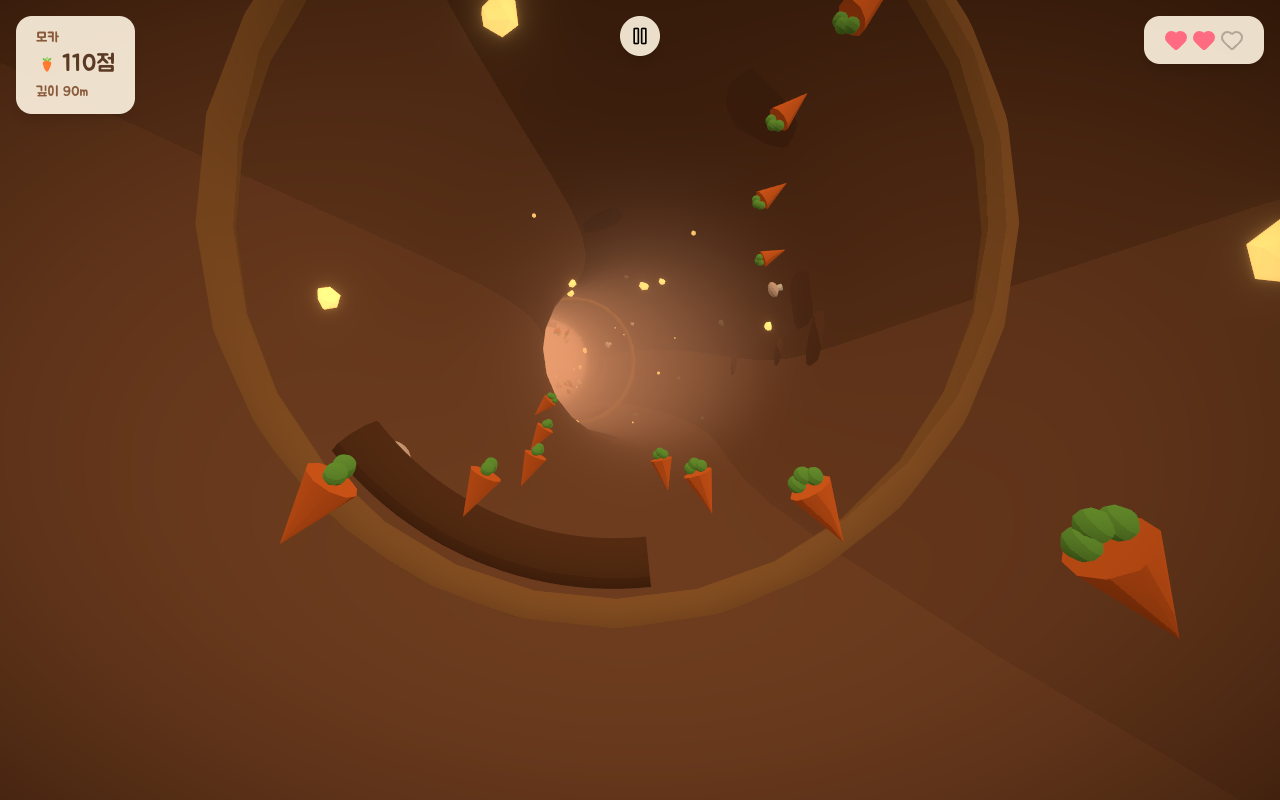
Later, when the burrows grew to three, the lighting split per theme as well.
Sky color, ground color, hemisphere intensity, directional color and intensity are all set per theme, and I added one more field on top: a fill light just for the rabbit.
The values give away the reason.
The bright dirt burrow sits at 1.0, while the crystal cave is 3.4 and the moonlit burrow is 4.0.
In the dark burrows the rabbit's silhouette, fur color, and blush were sinking straight into the background.
Raising the overall lighting would have thrown away the darkness that makes those burrows feel like they do, so the only option was to lift the area around the rabbit locally.
The dirt burrow stays at 1.0 because it's already bright and any more would blow it out.
The angle where the walls disappeared
The one that took longest was something else.
At certain angles the tunnel wall looked like it had vanished.
More precisely, in stretches where the view direction ran nearly parallel to the wall, the darkest toon band collapsed to the same dark brown as the background and the fog.
With no boundary between wall and background, the decorations stuck to the wall appeared to float in midair, and the rabbit's lower half looked buried in it.
It's a problem toon shading creates.
With only three bands, once a surface falls into the darkest one there's no information below that.
Under PBR some faint brightness difference would still have described the surface; quantization erased it.
The fix was laying a very weak self-illumination on the wall.
Give it an emissive in the palette's mid tone and keep the intensity low, around 0.25.
That puts a floor under the darkest band, so the wall reads as a surface from any angle.
The intensity is low because the burrow must not get brighter, and the color comes from the palette so each burrow keeps its own tint.
<meshToonMaterial
  color={pal.tunnelDirt}
  gradientMap={grad}
  emissive={pal.tunnelMid}
  emissiveIntensity={0.25}
  side={THREE.BackSide}
/>
It came down to how you paint it
Even with the same geometry, the way you paint it changes the entire mood.
The difference between gray plastic and a twilight burrow wasn't in the polygons, it was in the shading.
Though picking a style also means taking on that style's weaknesses.
I got the crisp toon faces, and in exchange I had to go back and patch the information that disappears on the dark end.
Next time: the React 19 rabbit hole, where I thought the visuals were all locked in and then the whole screen went dead.